Active Phishing Campaign Affecting Local Businesses and Organisations
The Cyber Security Centre is issuing an urgent and ongoing warning to local businesses and organisations regarding a widespread phishing campaign that has already resulted in multiple confirmed email (and other account) compromises across the local business community.
A compromise means an attacker has gained unauthorised access to an email account or system, enabling them to take data, move into other systems, impersonate users, and potentially return later to demand payment or carry out further attacks.
There is significant concern that other local businesses may already be compromised without their knowledge and at risk of future phishing attacks.
Why This Warning Is Especially Important
In several confirmed cases, attackers have:
- Successfully obtained user login credentials
- Gained access to email and cloud-based systems
- Remained inactive or low-profile for several days or longer
- Only later used that access to send phishing emails to existing contacts
This means that:
An organisation does not need to have sent phishing emails to demonstrate a compromise.
If your organisation has received these types of emails, there is a real possibility that:
- A colleague interacted with one
- Login credentials were entered
- Access was gained
- The compromise has not yet been detected
Description of the Phishing Emails
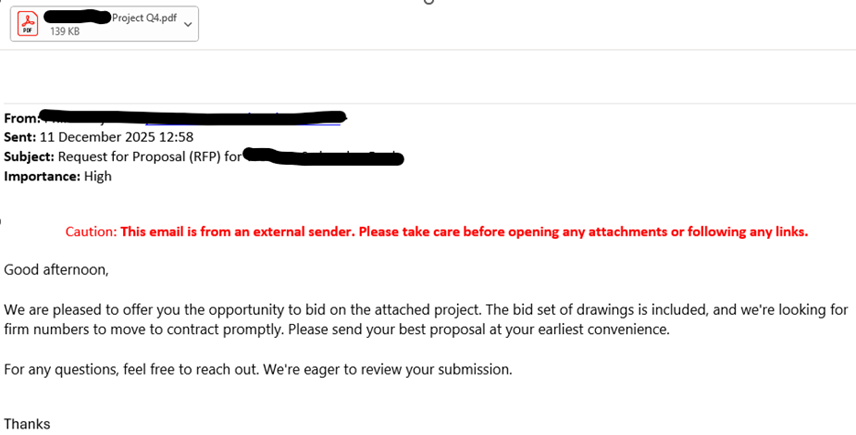
The phishing emails are designed to appear as legitimate business communications, commonly framed as Requests for Proposal (RFPs) or procurement-related messages.
Common features include:
- A familiar sender name or email address
- A PDF document that opens via Microsoft Edge and presents a credential-capture login prompt
- A request to review a document or submit a proposal
Attackers continuously adapt:
- Sender details
- Language and tone
- Subject lines
- Attachment names
Observed Impact to Date
Confirmed attacker activity has included:
- Access to user and administrative email accounts
- Repeated access to cloud storage platforms
- In at least one case, financial system compromise and significant monetary loss
- Delayed onward phishing from compromised accounts after trust had been established
The Risk of ‘Silent’ Compromise
A key characteristic of this campaign is delayed exploitation.
Attackers may:
- Read emails without sending any
- Monitor internal conversations
- Access cloud files covertly
- Wait for opportunities to escalate privileges or target financial systems
This makes early investigation and verification critical, even where no obvious indicators of compromise are present.
What Organisations Should Do Immediately
(Please Share This Section with Your IT Team or IT Provider)
If your organisation has received these phishing emails, you should assume elevated risk and ensure the following checks are carried out as a matter of priority.
Where IT services are outsourced, this information should be passed to your IT provider without delay.
Initial Compromise Checks (High Value, Low Effort)
IT teams or providers should review:
- Sign-In Activity
- Logins from unexpected countries or regions
- Logins at unusual times
- Multiple failed login attempts followed by a successful sign-in
- Mailbox and Account Changes
- Unexpected inbox rules (forwarding, deletion, or hiding of emails)
- Emails sent that the user does not recall sending
- Changes to mailbox or audit settings
- Multi-Factor Authentication (MFA)
- New MFA methods added
- MFA prompts approved unexpectedly
- Confirmation that MFA is enabled and correctly enforced
- Cloud Storage Activity
- Unusual access to OneDrive, SharePoint, or similar platforms
- Large or repeated downloads
- Access from unknown devices or locations
- Privileged Access
- Unexpected access to administrative accounts
- Any changes to roles or permissions
- Signs of privilege escalation
These checks can typically be completed within hours, not days, and may prevent further damage.
Staff Awareness – Emails with Links and Attachments
In light of the confirmed compromises and the ongoing threat, organisations are strongly advised to re-affirm and, where necessary, update staff guidance on handling emails that contain links or attachments.
General Principles
- Unexpected attachments or links should never be trusted
- The sender’s name or email address must not be relied upon as proof of legitimacy
- Any interaction (clicking links, opening files, entering credentials) must be reported immediately
Assessing Whether an Email Was Expected
If an email contains links or attachments, staff should ask:
- Was this document explicitly expected at that time?
- Does the email include specific, verifiable detail, i.e. that it’s not something generic anyone could write?
If the answer to these questions is no, the email should be treated as suspicious and reported without interacting with it. If an email is suspicious is very unlikely that it would be genuine and telephoning the Sender to verify is most often not necessary. However, if the Sender looks to have been compromised, please telephone (but do not email) to warn them and encourage them to contact their I.T. provider urgently.
Reporting and Support
A compromise is a serious cyber-security incident that can have immediate and longer-term consequences if not fully understood and addressed. While internal IT teams or IT providers play a vital role in response and recovery, organisations may also wish to engage specialist cyber-security companies that focus on incident response and investigation, as these companies are specifically designed to provide incident response support and cyber-risk assessments.
All suspected phishing emails can be reported to:
📧 SERS@OCSIA.im
Incident reporting, in cases of a compromise, can be reported to the Cyber Security Centre (and to the Isle of Man Constabulary), please use our form:
https://csc.gov.im/cyber-concerns-online-reporting-form
EXAMPLE EMAIL: